Snort Custom Rule Detection Lab
Snort Custom Rule Detection Lab Overview
This project demonstrates the creation and testing of custom intrusion detection rules using Snort in a controlled lab environment. The objective was to configure Snort to detect specific types of network traffic and generate alerts when those traffic patterns occur.
Two detection scenarios were implemented:
Detecting ICMP traffic sent to Google’s public DNS server 8.8.8.8
Detecting TCP connection attempts targeting port 4444
The lab validates how signature-based detection systems identify suspicious or predefined network activities.
Objectives
The primary goals of this lab were to:
Create custom Snort detection rules
Configure Snort to monitor network traffic
Generate test traffic to trigger rule alerts
Validate that alerts are successfully logged
This exercise simulates real-world IDS use cases where security analysts monitor networks for suspicious patterns.
Lab Environment Component Description IDS Snort Operating System Linux-based lab environment Traffic Generation Tools ping, hping3 Log Directory /var/log/snort Network Interface enp0s3
The IDS monitored traffic from the lab network interface and logged alerts when rule conditions were met.
Detection Rule 1: ICMP Traffic to Google DNS
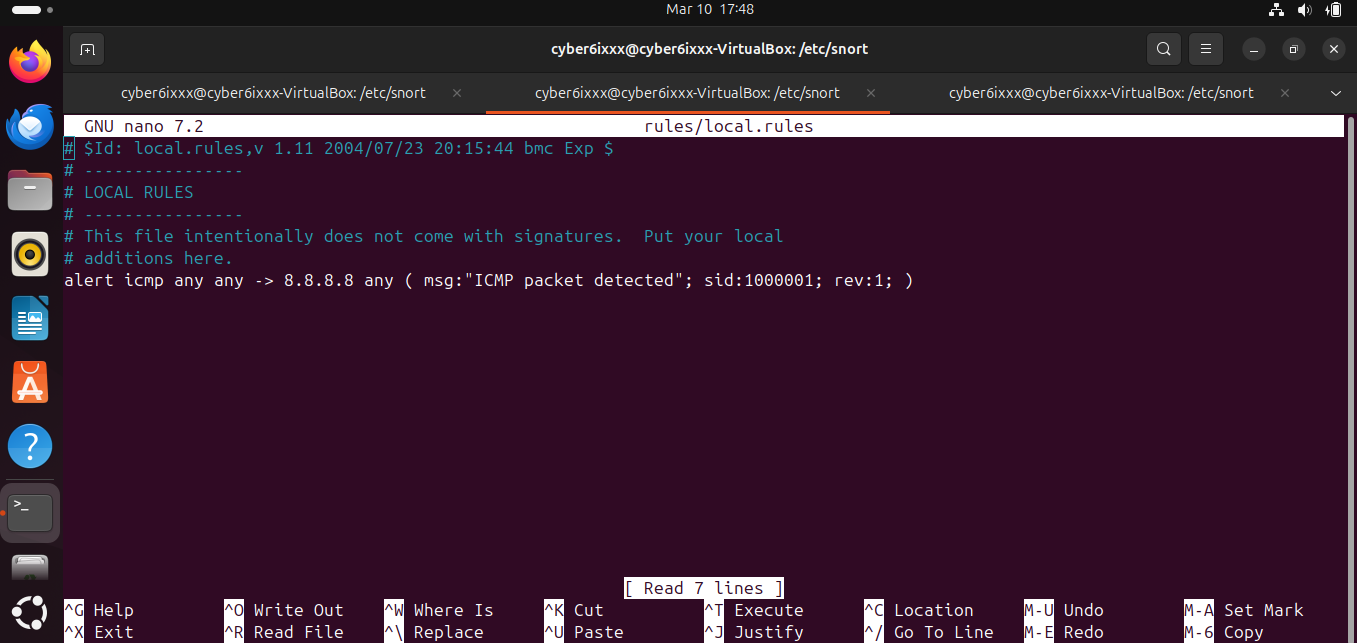 Figure 1: Creating a Snort rule to detect ICMP traffic destined for 8.8.8.8.
Rule Definition
A Snort rule was created to detect ICMP packets destined for Google’s public DNS server.
alert icmp any any -> 8.8.8.8 any (msg:”ICMP packet detected”; sid:1000001; rev:1;) Rule Breakdown Field Meaning alert Generate an alert when rule conditions match icmp Monitor ICMP protocol any any Match any source IP and port -> Traffic direction 8.8.8.8 Destination IP address msg Alert message displayed sid Unique Snort rule identifier rev Rule revision
This rule triggers whenever any internal host sends an ICMP packet to 8.8.8.8.
Running Snort
Snort was started in console alert mode using the following command:
sudo snort -A console -l /var/log/snort -i enp0s3 -c /etc/snort/snort.conf -q Command Explanation Option Function -A console Display alerts directly in terminal -l Log alerts to specified directory -i Network interface to monitor -c Snort configuration file -q Quiet mode
Snort then began monitoring network traffic on the interface.
Testing the ICMP Detection Rule
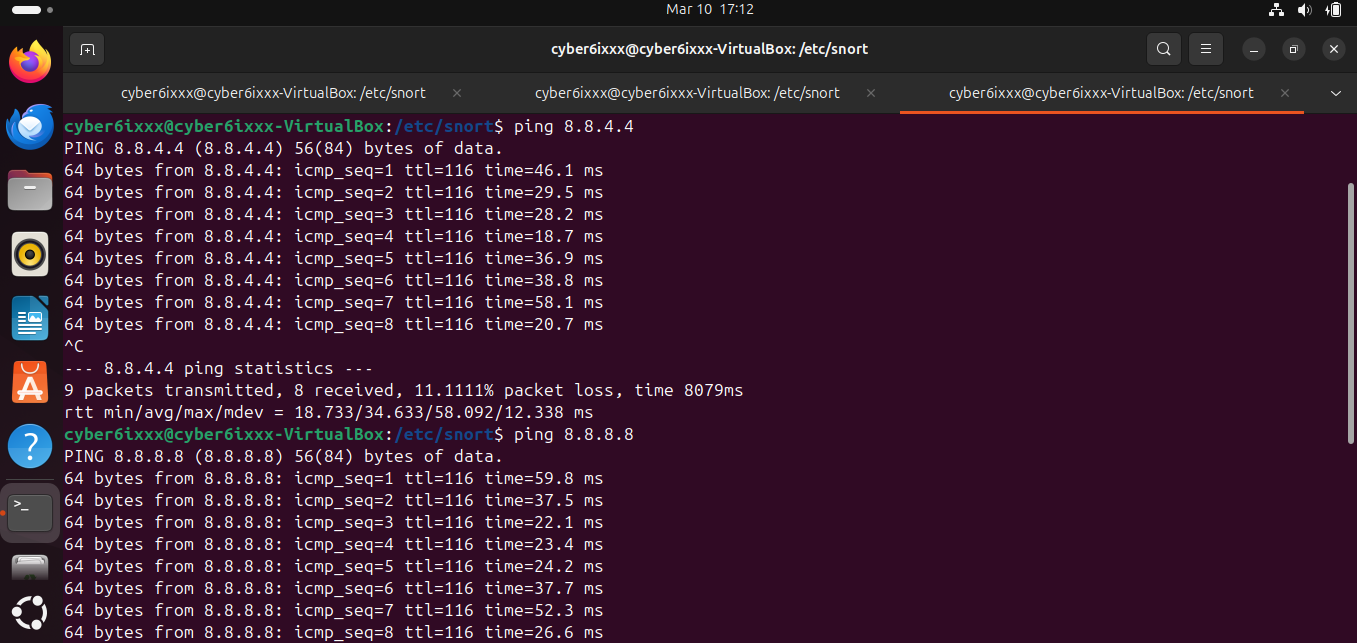 Figure 2: Testing ICMP traffic using ping to compare detection behavior.
Test 1: Ping to Alternate Google DNS ping 8.8.4.4
Result:
No alert was triggered because the rule only monitors traffic directed at 8.8.8.8.
Test 2: Ping to Targeted Address ping 8.8.8.8
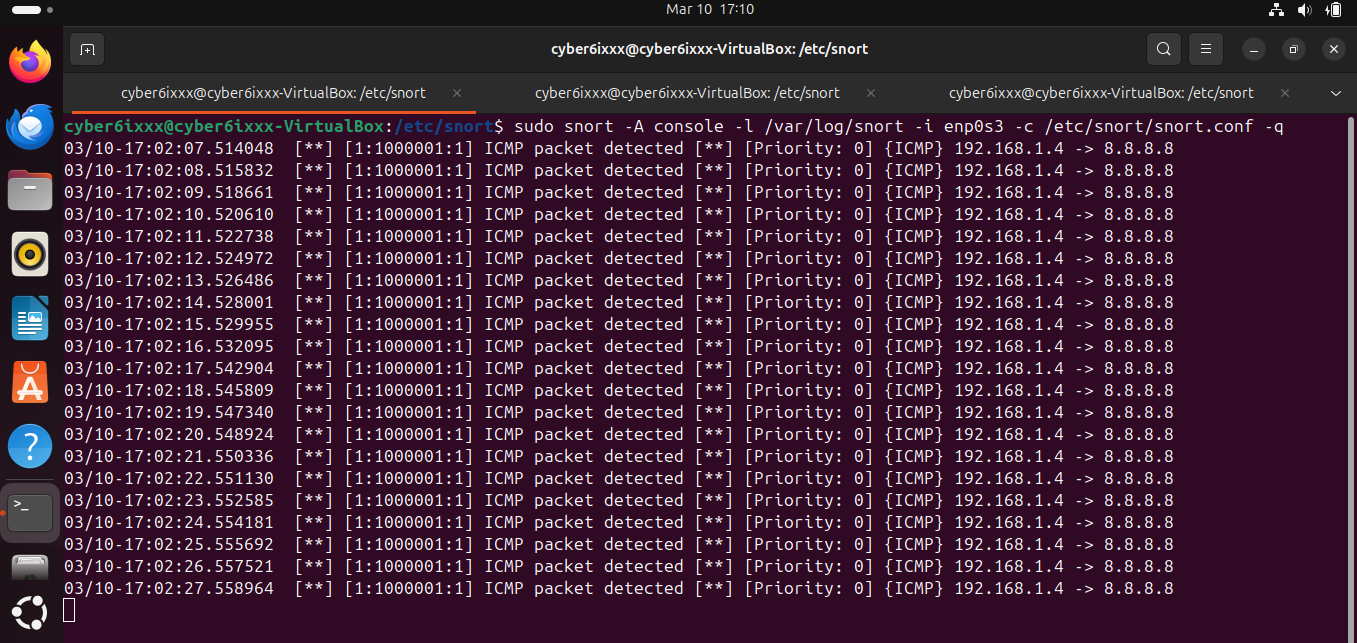 Figure 3: Snort detecting ICMP traffic directed to 8.8.8.8.
Result:
Snort successfully generated an alert indicating the detection of an ICMP packet matching the rule conditions.
This confirmed that the rule was functioning correctly.
Detection Rule 2: TCP Connection to Port 4444
The rule was then modified to detect TCP connection attempts targeting port 4444.
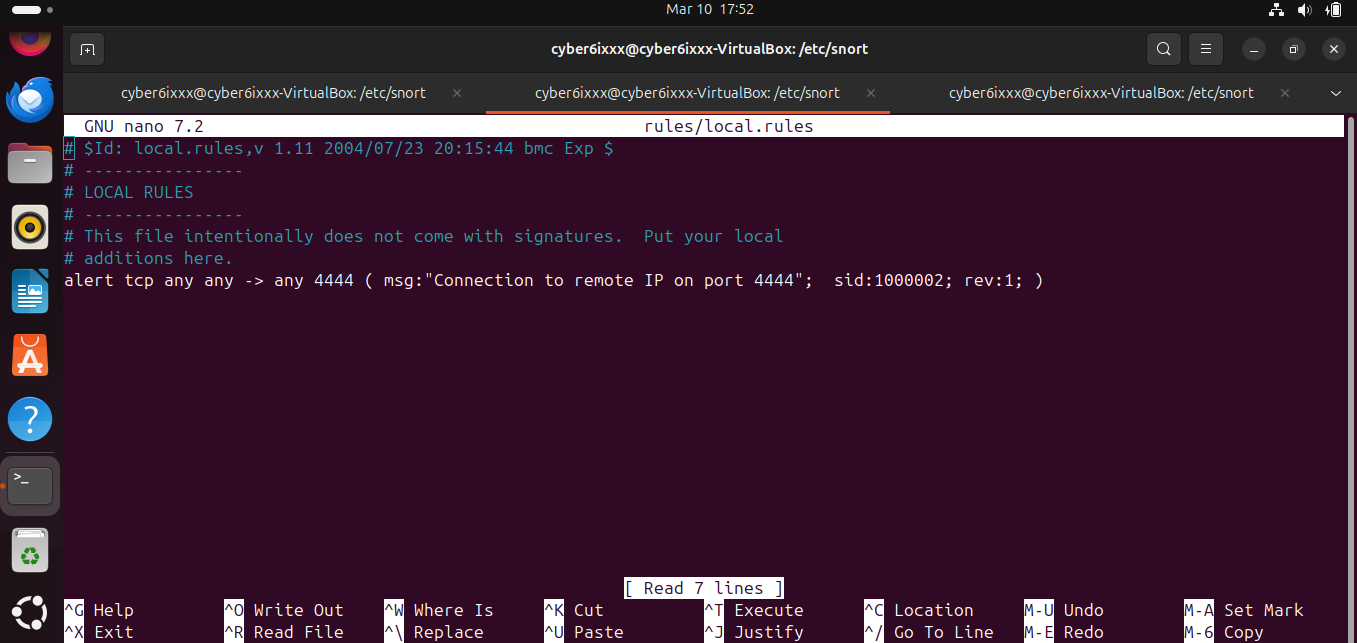 Figure 4: Creating a Snort rule to detect TCP connections to port 4444.
alert tcp any any -> any 4444 (msg:”Connection to remote IP on port 4444”; sid:1000002; rev:1;) Purpose
Port 4444 is often used by:
reverse shells
penetration testing tools
unauthorized remote access services
Monitoring connections to this port can help detect potential malicious activity.
Generating Test Traffic
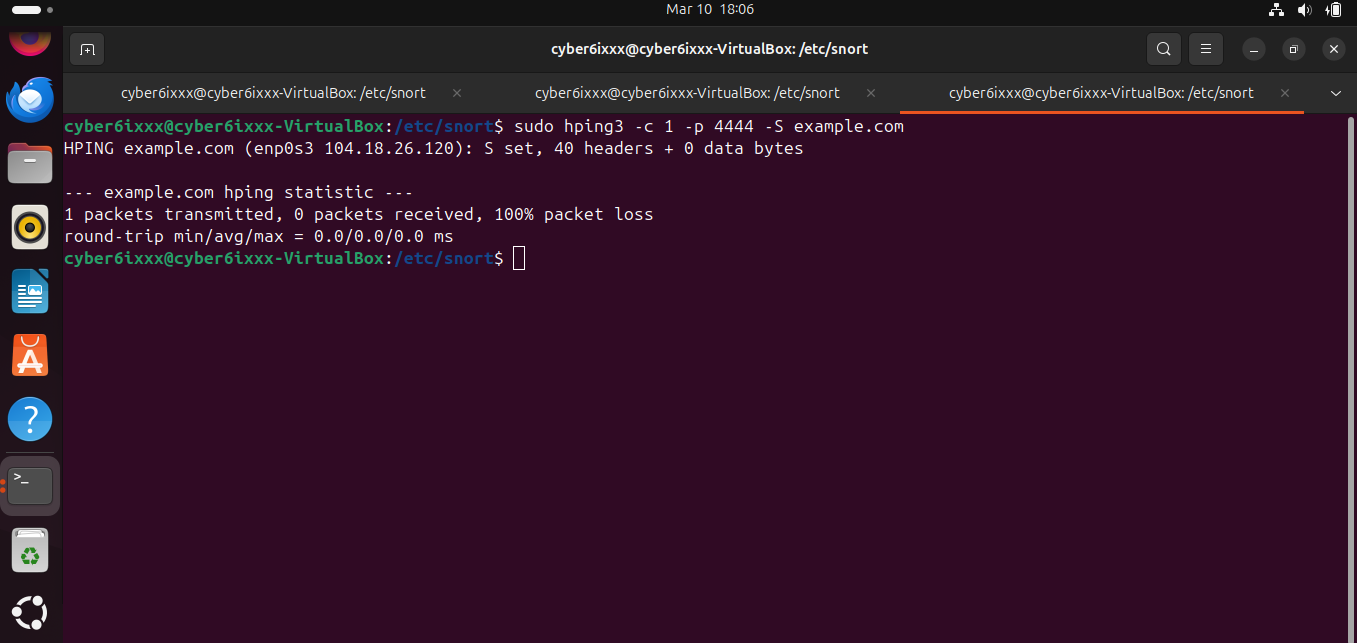 Figure 5: Generating a TCP SYN packet to port 4444 using hping3.
Traffic was generated using hping3.
sudo hping3 -c 1 -p 4444 -S example.com Command Breakdown Option Description -c 1 Send a single packet -p 4444 Target port -S Set TCP SYN flag example.com Destination host
This command sends a TCP SYN packet to example.com on port 4444, simulating a connection attempt.
Detection Results
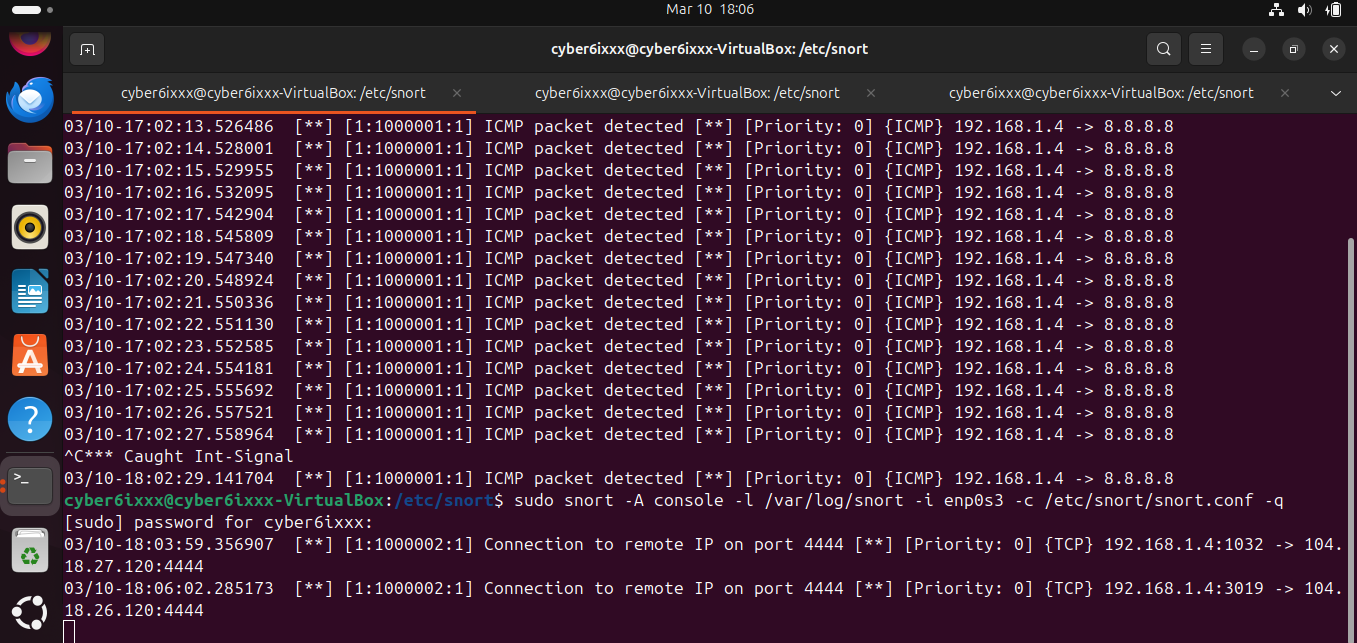 Figure 6: Snort alert generated after detecting TCP SYN traffic targeting port 4444.
When the packet was sent:
Snort generated an alert in the console
The alert was logged in /var/log/snort
The rule correctly identified the SYN packet targeting port 4444
This demonstrates the effectiveness of Snort’s rule-based detection capability.
Evidence Collected
The following artifacts were captured during testing:
Snort rule configuration screenshots
Terminal output displaying generated alerts
Ping test output
hping3 traffic generation results
Snort alert logs
These artifacts validate the successful execution of the lab.
MITRE ATT&CK Relevance
Detection rules like these help identify activities associated with:
Technique Description Network Service Discovery Detecting reconnaissance activity Command and Control Monitoring unusual outbound connections Remote Access Identifying suspicious ports used by backdoors
These monitoring capabilities are essential components of network security operations.
Key Takeaways
This lab demonstrates how Snort can be used to detect specific traffic patterns using custom rules.
Key skills practiced include:
Writing custom IDS detection rules
Configuring Snort monitoring
Generating network test traffic
Validating IDS alerts
Logging and analyzing detection events
These techniques are commonly used by SOC analysts, blue team defenders, and network security engineers.
Future Improvements
Possible enhancements to this project include:
Integrating Wireshark to capture and analyze the same traffic
Creating additional rules to detect suspicious scanning behavior
Logging alerts to a SIEM platform
Expanding rule coverage for multiple protocols