Splunk Powershell Scriptblock Logging Lab
Splunk PowerShell Script Block Logging Lab
Detecting PowerShell Abuse Using Windows Event ID 4104
Overview
This project documents a hands-on SOC detection lab focused on identifying suspicious PowerShell activity using Windows PowerShell Script Block Logging and Splunk.
The objective of the lab was to understand how defenders investigate PowerShell-based attacker behavior using:
- Windows Event ID 4104
- Script Block Logging
- Process creation telemetry
- Event correlation
- Threat hunting workflows
Using Splunk Enterprise and Windows telemetry, I investigated:
- PowerShell execution activity
- ScriptBlockText visibility
- Encoded command behavior
- PowerShell download activity
- Process execution relationships
- Correlation between Event ID 4104 and process creation telemetry
This lab introduced one of the most valuable telemetry sources in Windows detection engineering.
Why PowerShell Matters in Security Operations
PowerShell is one of the most heavily abused tools in modern cyber attacks because it is:
- Trusted by Windows
- Built into the operating system
- Extremely powerful
- Capable of remote administration
- Scriptable and automatable
- Able to execute commands directly in memory
Attackers abuse PowerShell for:
- Malware delivery
- Download cradles
- Remote execution
- Credential theft
- Reconnaissance
- Persistence
- Lateral movement
- Fileless malware execution
Because PowerShell is commonly used by administrators, malicious activity can blend into legitimate operations.
This makes PowerShell monitoring extremely important for SOC analysts.
Why Event ID 4104 Is High-Value Telemetry
Earlier investigations may reveal:
- powershell.exe execution
- Encoded commands
- Suspicious parent processes
- Hidden PowerShell windows
However, Event ID 4104 goes much deeper.
PowerShell Script Block Logging can reveal the actual executed PowerShell code.
This means defenders may directly observe:
- Invoke-WebRequest
- IEX
- DownloadString
- Download URLs
- Reconnaissance commands
- Obfuscated payloads
- Credential theft logic
This dramatically improves investigation quality and threat visibility.
Lab Environment
Virtual Machines Used
| Machine | Purpose |
|---|---|
| Ubuntu VM | Splunk Enterprise Server |
| Windows VM | Endpoint telemetry source |
| Kali Linux VM | SOC practice environment |
Technologies Used
| Tool | Purpose |
|---|---|
| Splunk Enterprise | SIEM and log analysis |
| PowerShell | Telemetry generation |
| Windows Event Logs | Security telemetry |
| Script Block Logging | PowerShell visibility |
| Sysmon | Process monitoring |
| CMD | Command execution |
LAB — Enabling PowerShell Script Block Logging
Objective
The objective of this lab was to enable PowerShell Script Block Logging, generate PowerShell telemetry, and investigate the resulting logs using Splunk.
The following commands were executed as Administrator:
New-Item -Path "HKLM:\\SOFTWARE\\Policies\\Microsoft\\Windows\\PowerShell\\ScriptBlockLogging" -Force
Then:
Set-ItemProperty -Path "HKLM:\\SOFTWARE\\Policies\\Microsoft\\Windows\\PowerShell\\ScriptBlockLogging" -Name EnableScriptBlockLogging -Value 1
After enabling logging, PowerShell was restarted.
Safe Telemetry Generation
The following benign commands were executed to generate telemetry:
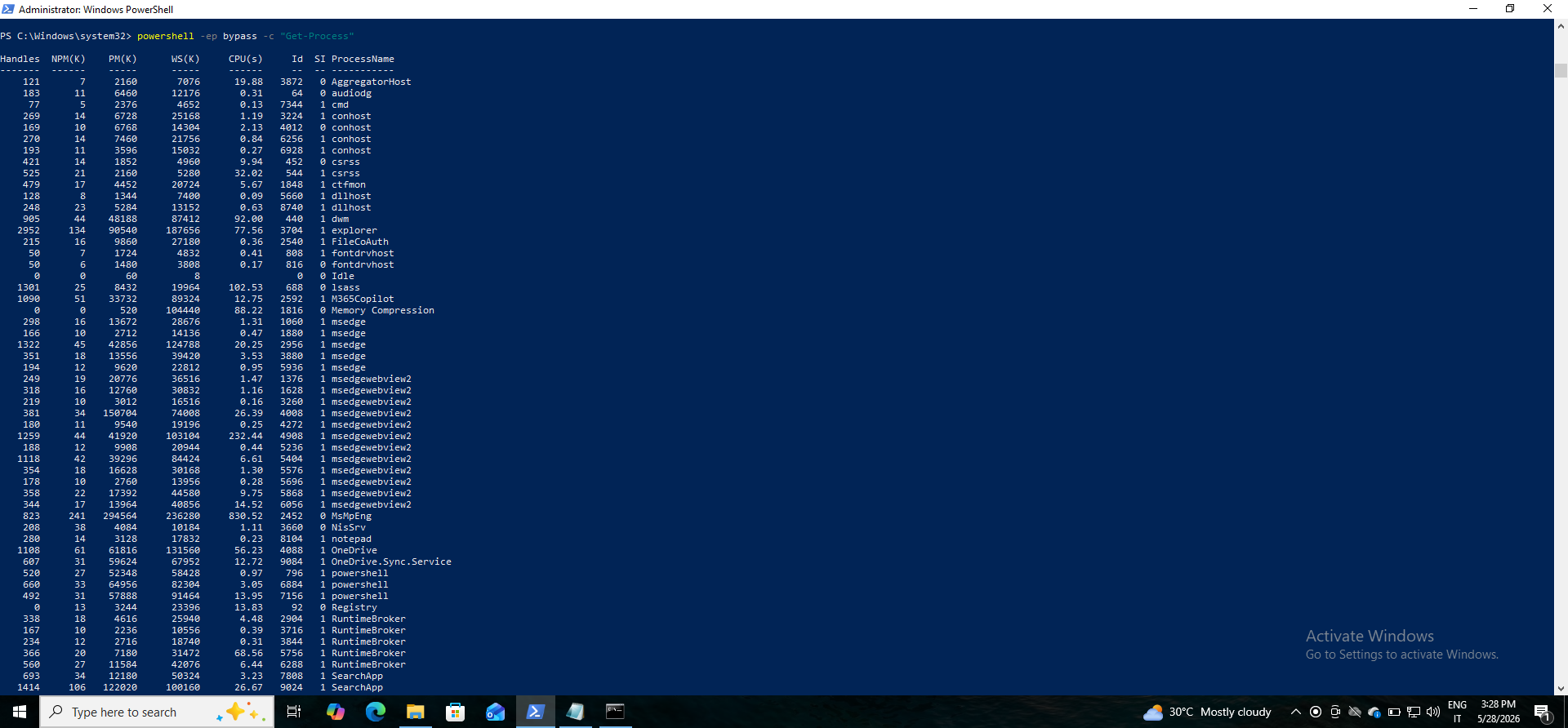
powershell -ep bypass -c "Get-Process"
Then:
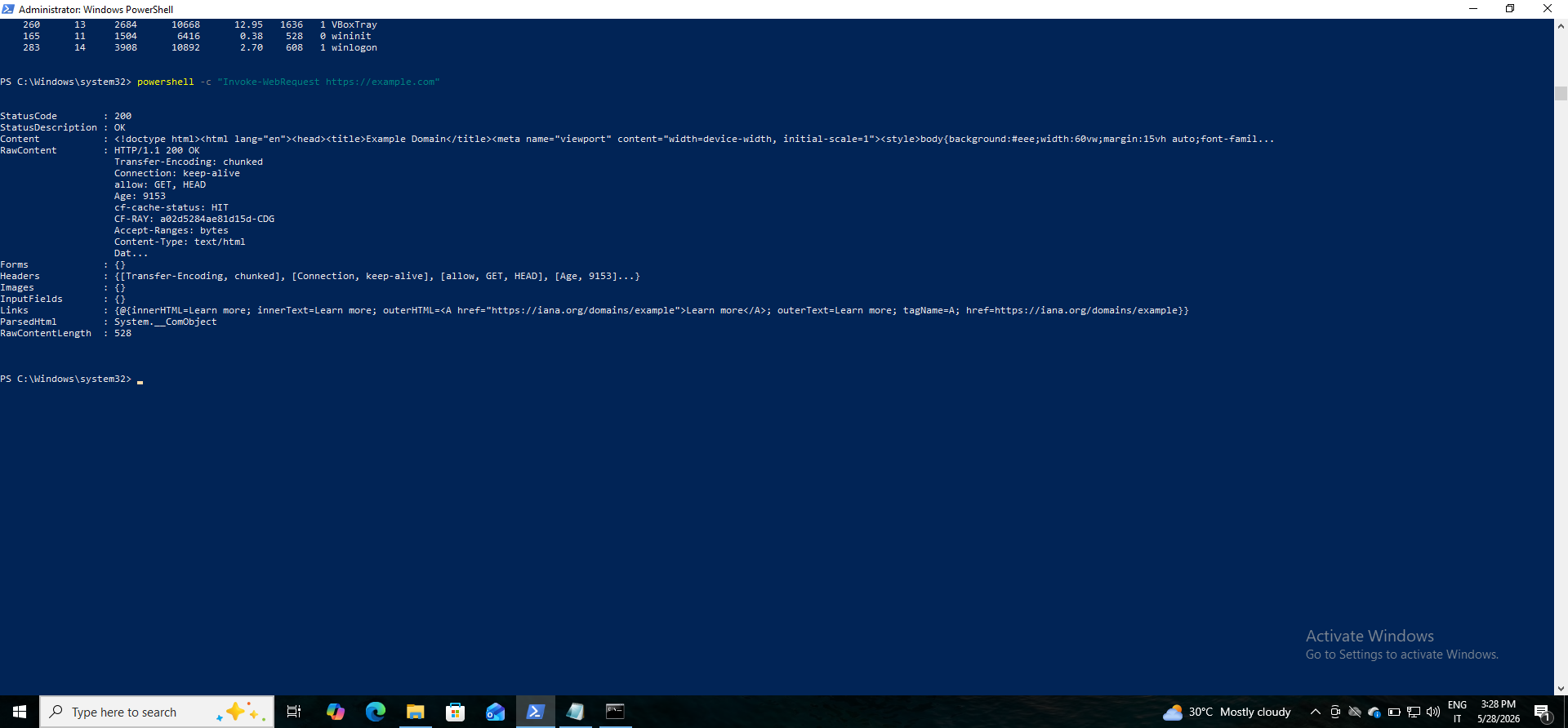
powershell -c "Invoke-WebRequest https://example.com"
These commands generated PowerShell execution events and Script Block Logging telemetry.
Screenshot 1 — PowerShell Telemetry Generation
Why Attackers Abuse PowerShell
Attackers heavily abuse PowerShell because it allows:
- Command automation
- In-memory execution
- Remote administration
- Downloading payloads
- Fileless execution
- Evasion of traditional antivirus solutions
PowerShell also enables attackers to perform complex operations quietly in the background with minimal user visibility.
This makes PowerShell one of the most abused Windows administration tools in modern attacks.
Why Encoded Commands Matter
Attackers commonly use:
-enc
or Base64-encoded PowerShell commands to:
- Hide malicious activity
- Evade simple detections
- Obfuscate payloads
- Bypass security controls
Encoded commands often indicate suspicious or malicious behavior, especially when combined with:
- Hidden windows
- Network activity
- Unusual parent processes
Why Obfuscation Matters
PowerShell obfuscation helps attackers:
- Hide malicious intent
- Evade detections
- Confuse analysts
- Bypass signature-based security tools
Common obfuscation techniques include:
- String concatenation
- Base64 encoding
- Character substitution
- Variable manipulation
- Dynamic command execution
Obfuscation is a major indicator of suspicious PowerShell activity.
Why Fileless Malware Is Dangerous
Fileless malware operates primarily in memory rather than writing files to disk.
This makes detection difficult because:
- Traditional antivirus tools often rely on file scanning
- Minimal disk artifacts are created
- Activity may disappear after reboot
- PowerShell can execute directly in memory
Attackers frequently combine PowerShell with:
- IEX
- DownloadString
- Invoke-WebRequest
- AMSI bypasses
to perform fileless attacks.
Splunk Investigation — Event ID 4104
SPL Query Used
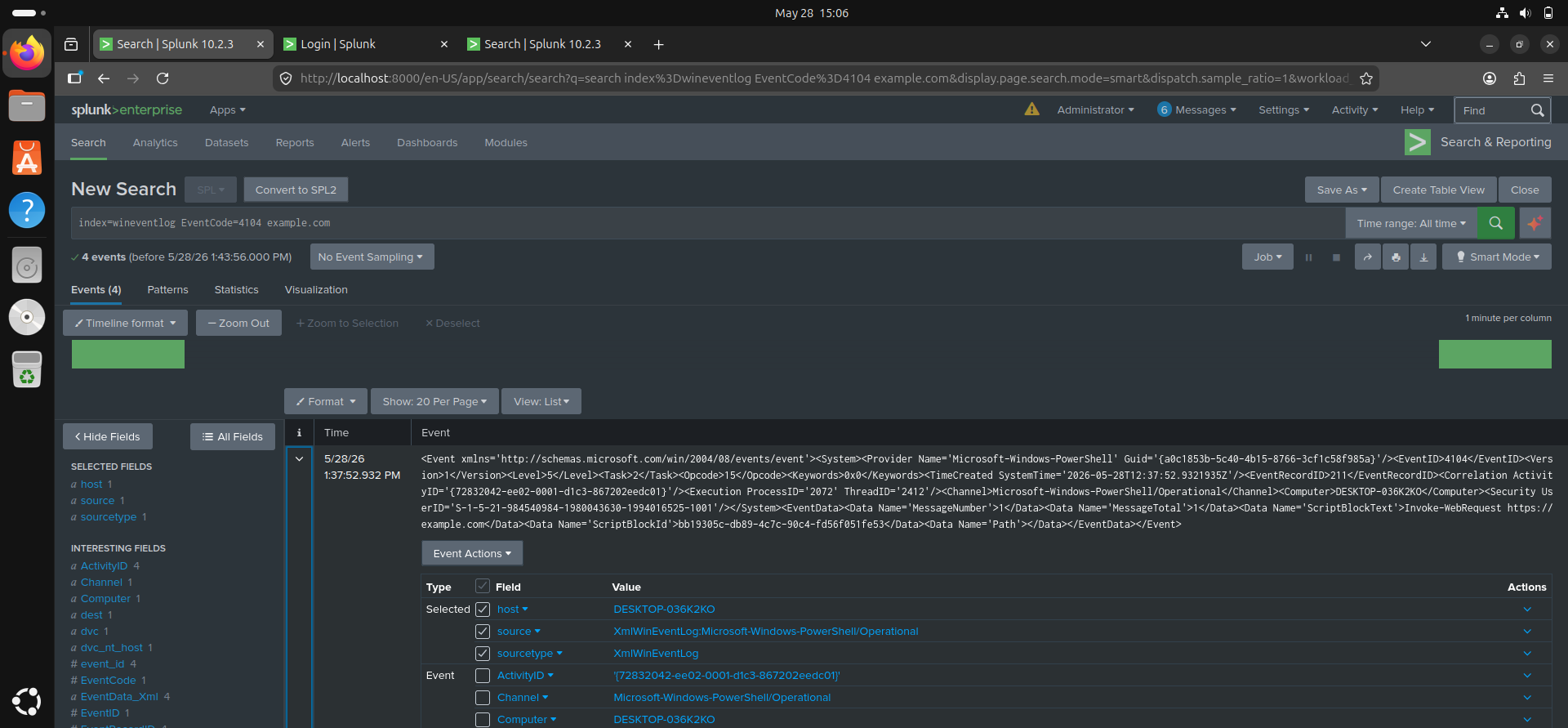
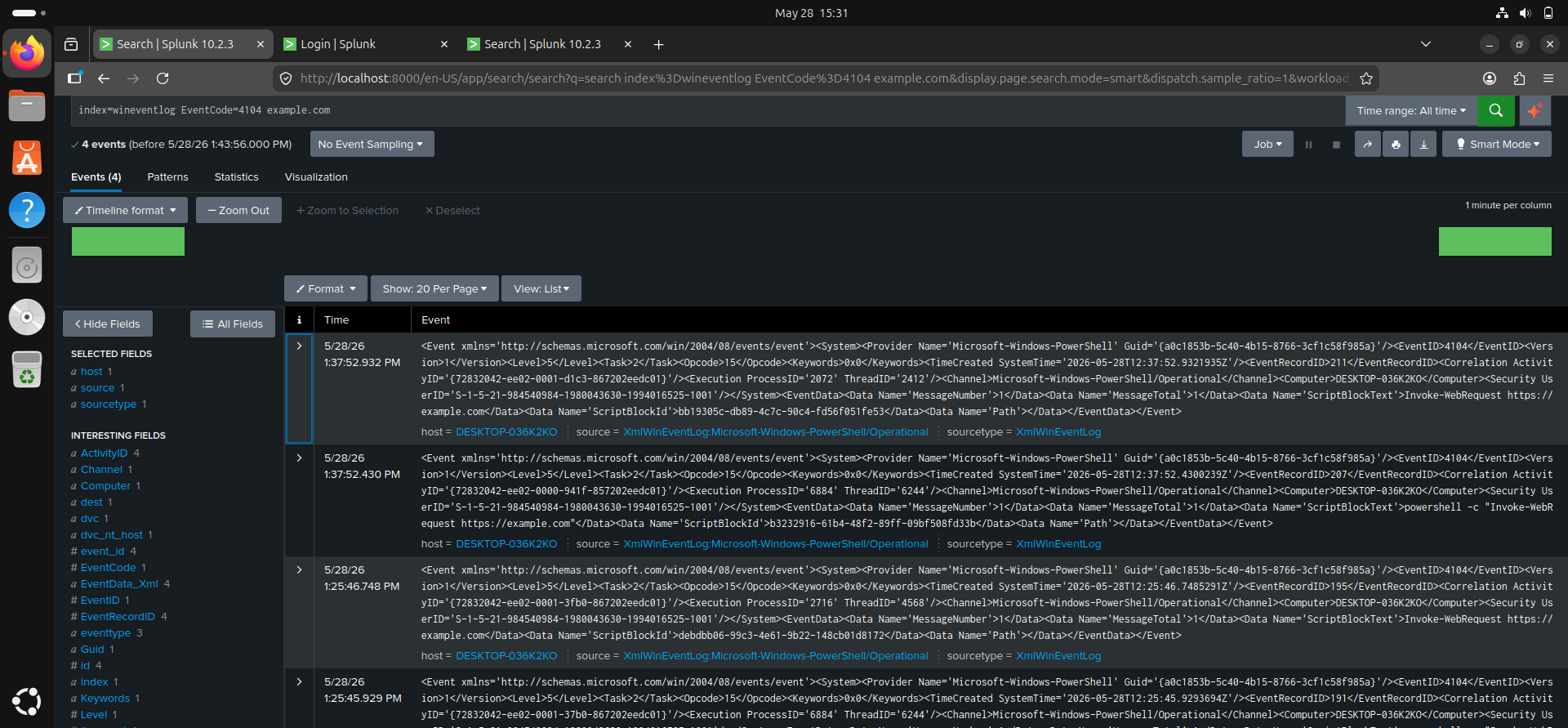
index=wineventlog EventCode=4104
If required:
index=wineventlog source="WinEventLog:Microsoft-Windows-PowerShell/Operational"
Important Fields Investigated
Key fields analyzed included:
- ScriptBlockText
- UserID
- Path
- ProcessID
- ComputerName
Among these fields:
ScriptBlockText is one of the most valuable fields for defenders.
This field reveals the actual PowerShell code executed on the system.
Why Defenders Love ScriptBlockText
ScriptBlockText provides direct visibility into attacker activity.
Defenders may observe:
- Download URLs
- PowerShell recon commands
- Credential dumping logic
- Obfuscated code
- Network activity
- Payload execution
This dramatically improves:
- Threat hunting
- Detection accuracy
- Incident investigations
- Malware analysis
Screenshot — Event ID 4104 Detection in Splunk
Why PowerShell Logging Can Be Noisy
PowerShell is widely used by:
- System administrators
- IT automation tools
- Enterprise software
- Cloud administration platforms
- Security products
This generates large volumes of legitimate telemetry.
Without tuning, defenders may experience:
- Alert fatigue
- Excessive logging
- High false-positive rates
Effective tuning is therefore critical.
Why PowerShell Spawned by Office Is Suspicious
One of the most suspicious behaviors defenders monitor is:
WINWORD.exe
   └── powershell.exe
or:
EXCEL.exe
   └── powershell.exe
This is suspicious because attackers commonly use:
- Malicious macros
- Phishing documents
- Embedded scripts
to launch PowerShell payloads.
Office applications rarely need to spawn PowerShell during normal operations.
How Defenders Tune Event ID 4104 Alerts
Defenders reduce noise by focusing on:
- Encoded commands
- Invoke-WebRequest
- DownloadString
- IEX usage
- Suspicious parent processes
- Hidden PowerShell windows
- Network-related PowerShell activity
- Obfuscation patterns
- AMSI bypass attempts
Behavioral tuning significantly improves detection quality.
Why Attackers Disable PowerShell Logging
Attackers often attempt to disable:
- Script Block Logging
- AMSI
- PowerShell transcription
- Security monitoring
because these controls expose malicious activity.
Disabling PowerShell logging is itself highly suspicious and may indicate active attacker evasion behavior.
Correlating Event ID 4104 with Process Execution
To improve investigation quality, I correlated:
- Event ID 4104
- Event ID 1 / Event ID 4688
This allowed reconstruction of:
- PowerShell execution chains
- Parent-child process relationships
- Script execution behavior
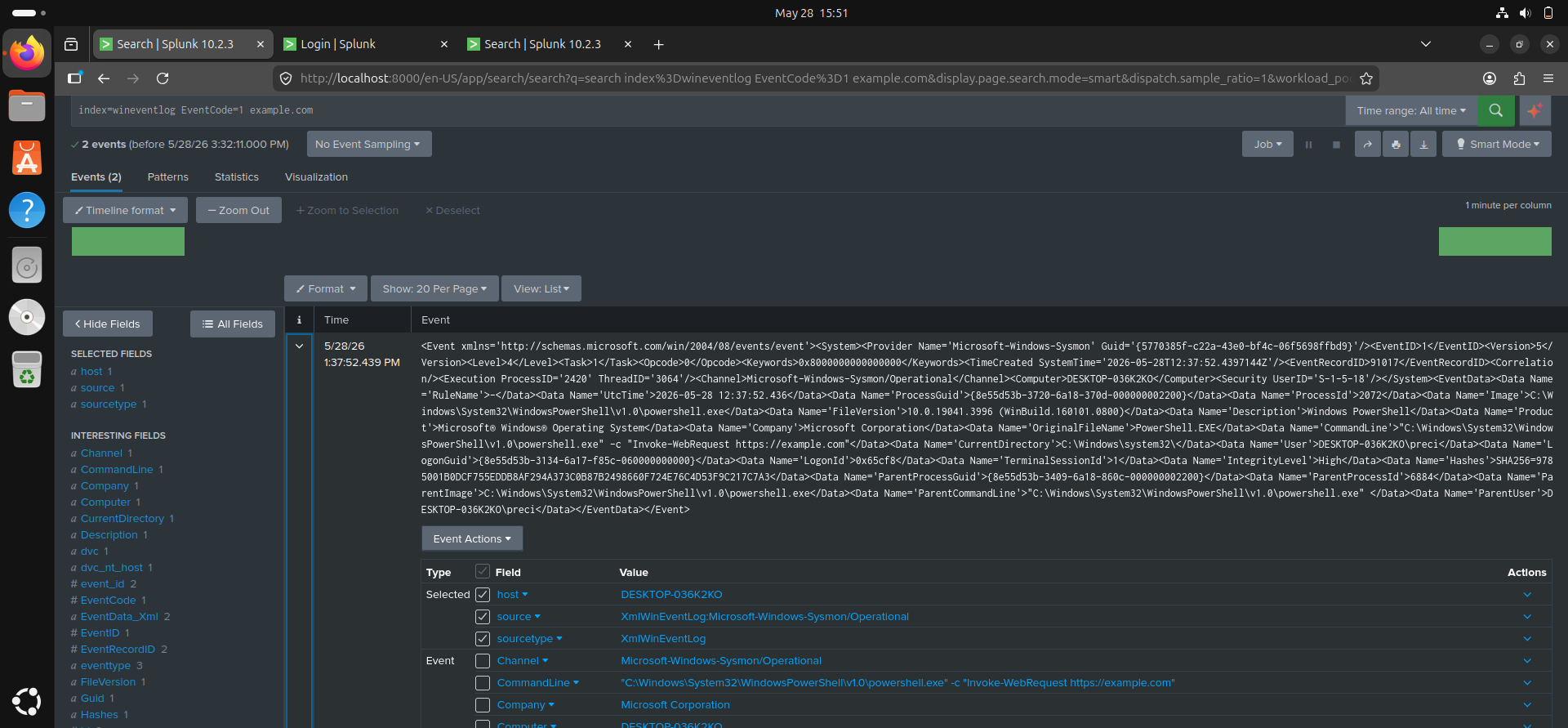
Correlation SPL Query
index=wineventlog (EventCode=4104 OR EventCode=1 OR EventCode=4688)
Correlation Findings
The investigation revealed:
powershell.exe
        └── ScriptBlockText execution
                └── Invoke-WebRequest activity
This demonstrated how PowerShell execution telemetry can be combined with process creation logs to reconstruct attacker behavior.
Screenshot — Correlated PowerShell Investigation
Skills and Knowledge Gained
Through this project, I gained practical experience in:
- PowerShell logging investigation
- Event ID 4104 analysis
- Script Block Logging
- Threat hunting
- Event correlation
- Process execution analysis
- Detection tuning
- Splunk investigations
Detection Relevance
PowerShell monitoring is one of the most important areas in SOC operations because PowerShell is involved in many modern attacks.
Monitoring Event ID 4104 helps defenders detect:
- Malicious PowerShell execution
- Fileless malware
- Download cradles
- Encoded commands
- Obfuscated scripts
- Remote execution activity
- Credential theft attempts
This makes Script Block Logging one of the highest-value telemetry sources in Windows security monitoring.
Challenges Encountered
Some challenges encountered during the lab included:
- Enabling Script Block Logging
- Understanding PowerShell Operational logs
- Interpreting ScriptBlockText
- Correlating multiple event sources
- Distinguishing legitimate vs suspicious PowerShell activity
Resolving these challenges improved my understanding of PowerShell detection engineering and SOC investigation workflows.
Future Improvements
Future improvements planned for this lab include:
- Detecting encoded PowerShell payloads
- Investigating AMSI bypass activity
- Monitoring Office-to-PowerShell execution chains
- Detecting obfuscated PowerShell scripts
- Correlating PowerShell with network telemetry
- Building advanced Splunk detection rules
Conclusion
This lab improved my understanding of how attackers abuse PowerShell and how defenders investigate PowerShell activity using Script Block Logging and Splunk.
By analyzing Event ID 4104 and correlating it with process execution telemetry, I gained practical experience in:
- PowerShell threat hunting
- Detection engineering
- Script analysis
- Event correlation
- Threat investigation
- SOC workflows
This project strengthened my understanding of one of the most important telemetry sources in modern Windows security operations.
Precious Anyanwu
| Cybersecurity Learner | SOC Analyst Path | Splunk SIEM Practice |