Splunk Process Tree Detection Lab
Splunk Process Tree Detection Lab — Parent and Child Process Investigation
Overview
This lab focuses on process creation monitoring and process tree analysis using Splunk and Windows Security Event Logs.
The objective of the lab was to understand how parent-child process relationships appear in Windows telemetry and how SOC analysts reconstruct execution chains during investigations.
Using Windows Event ID 4688, I investigated:
- Process creation events
- Parent-child process relationships
- PowerShell execution chains
- Hidden PowerShell execution
- Suspicious process spawning behavior
This lab was performed using a Windows virtual machine forwarding logs into Splunk Enterprise hosted on Ubuntu.
Lab Environment
Virtual Machines Used
| Machine | Purpose |
|---|---|
| Ubuntu VM | Splunk Enterprise Server |
| Windows VM | Event generation and telemetry source |
| Kali Linux VM | Additional SOC lab environment |
Technologies Used
| Tool | Purpose |
|---|---|
| Splunk Enterprise | SIEM and log analysis |
| Sysmon | Endpoint telemetry |
| Splunk Universal Forwarder | Windows log forwarding |
| Windows Event Logs | Process creation telemetry |
| PowerShell | Process execution testing |
| CMD | Parent process simulation |
Understanding Event ID 4688
Windows Event ID 4688 represents:
A New Process Has Been Created
This event is extremely important in SOC investigations because it allows analysts to:
- Track process execution
- Identify parent-child relationships
- Detect suspicious process chains
- Investigate malware execution
- Reconstruct attacker activity
Process creation telemetry is one of the most valuable data sources in threat detection.
LAB 1 — CMD → PowerShell → Notepad Execution Chain
Objective
The goal of this lab was to observe how process trees appear in Windows logs when one process spawns another.
I executed:
powershell -Command "notepad.exe"
from a CMD session.
This generated a process chain:
cmd.exe
   └── powershell.exe
          └── notepad.exe
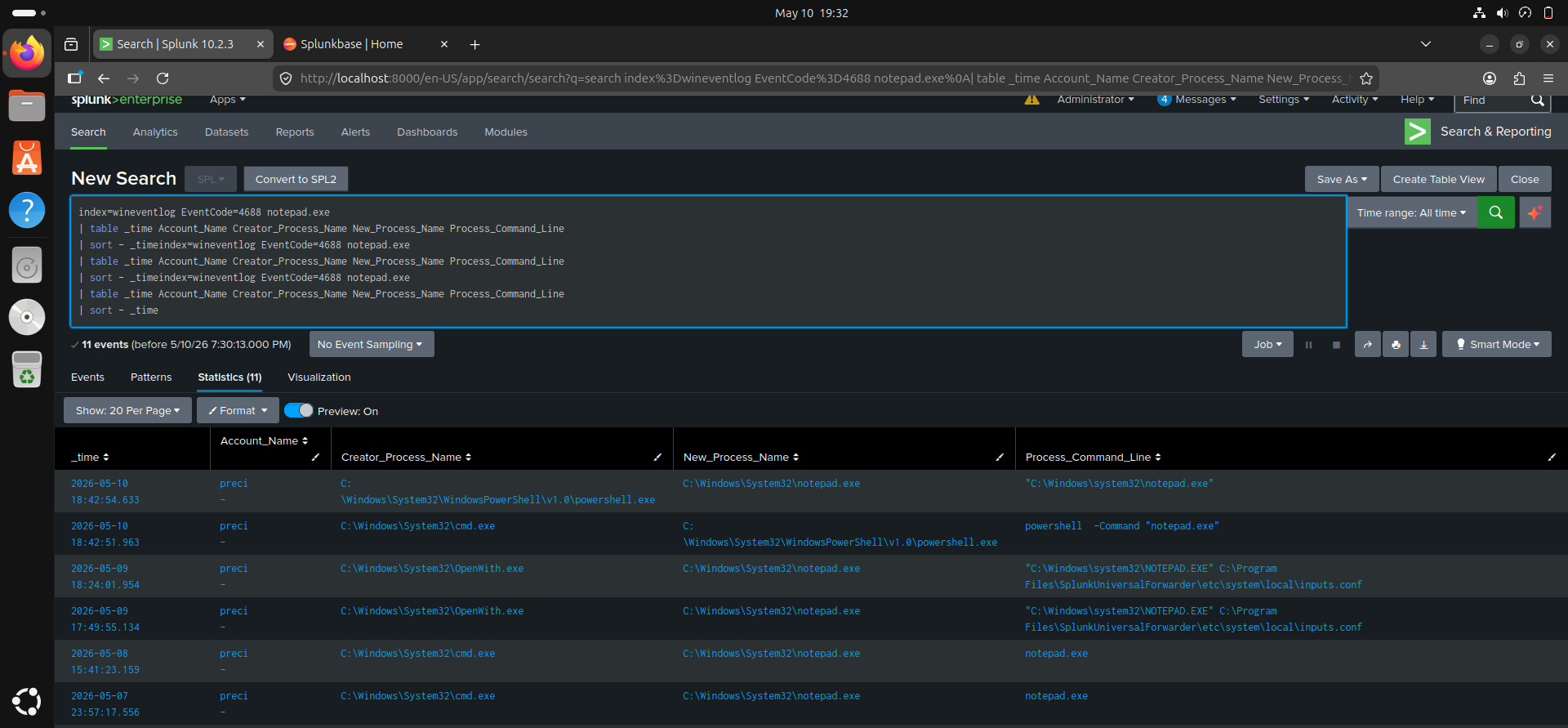
SPL Query Used
index=wineventlog EventCode=4688 notepad.exe
| table _time Account_Name Creator_Process_Name New_Process_Name Process_Command_Line
| sort - _time
Investigation Findings
Using Splunk, I analyzed:
- Parent process names
- Child process names
- Process command lines
- Execution timestamps
- Process creation relationships
The investigation revealed:
Parent Process
cmd.exe
Child Process
powershell.exe
followed by:
notepad.exe
This demonstrated how attackers and administrators can chain processes together during execution.
Why Process Trees Matter
Attackers rarely execute only a single isolated process.
Instead, malicious activity often appears as process chains such as:
Office Application
   └── powershell.exe
          └── cmd.exe
                 └── rundll32.exe
                        └── malware payload
SOC analysts reconstruct attacks by analyzing parent-child process relationships.
This helps identify:
- Malicious PowerShell usage
- LOLBins (Living Off The Land Binaries)
- Script-based execution
- Malware launch chains
- Privilege escalation attempts
Screenshot 1 — Event ID 4688 Process Creation Events
Screenshot 2 — CMD → PowerShell → Notepad Process Chain
LAB 2 — Hidden PowerShell Execution Chain
Objective
The purpose of this lab was to investigate hidden PowerShell execution and identify suspicious process behavior.
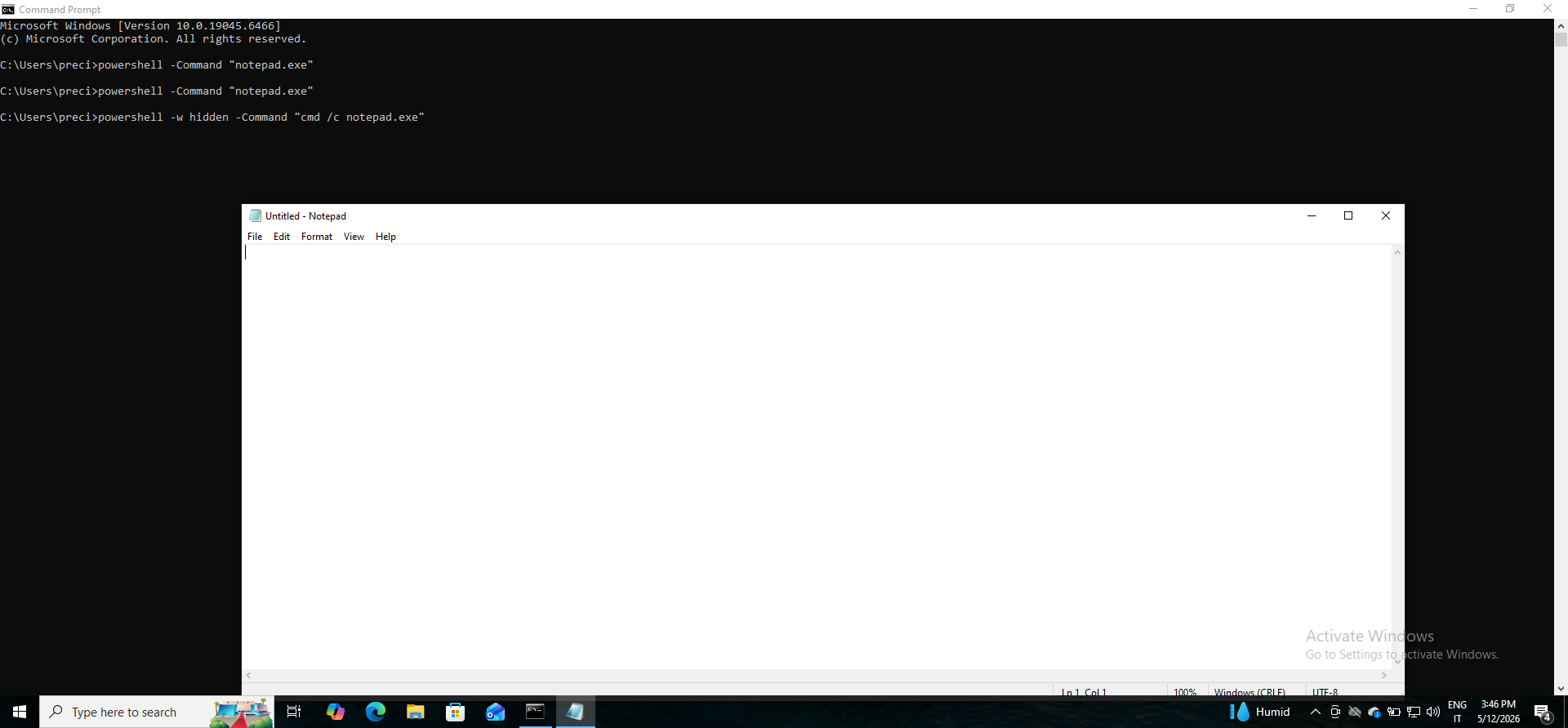
I executed:
powershell -w hidden -Command "cmd /c notepad.exe"
This command launches PowerShell with a hidden window and spawns CMD, which then launches Notepad.
Investigation Questions
During analysis, I investigated:
- Which process executed first?
- Which process became hidden?
- Which process remained visible?
- Which process appeared suspicious?
- How the execution chain changed compared to Lab 1
SPL Query Used
index=wineventlog EventCode=4688
| table _time Account_Name Creator_Process_Name New_Process_Name Process_Command_Line
| sort - _time
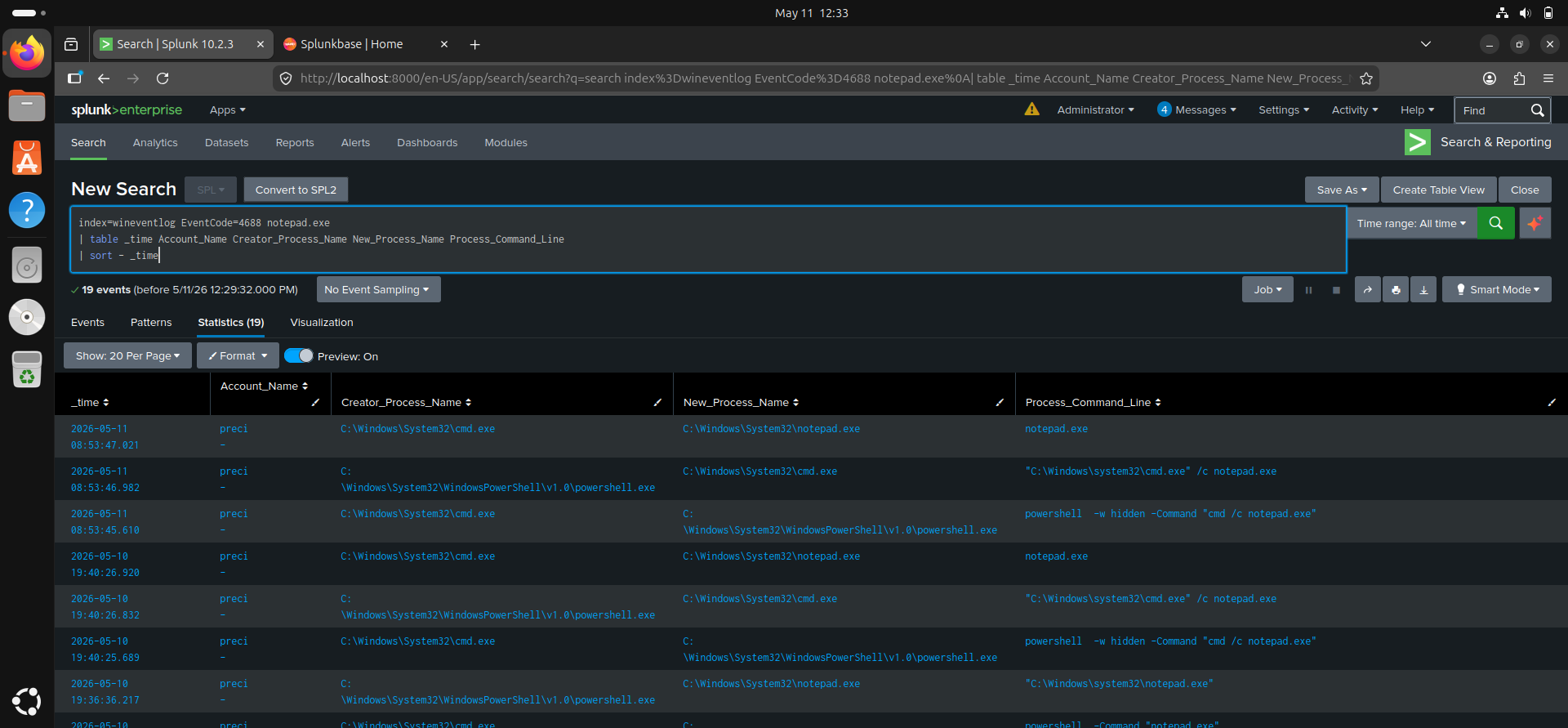
Investigation Findings
The process execution chain appeared similar to:
powershell.exe (hidden)
      └── cmd.exe
              └── notepad.exe
Key observations:
- PowerShell executed with hidden window arguments
- CMD was spawned from PowerShell
- Notepad was launched through CMD
- Hidden PowerShell execution can indicate suspicious activity
This behavior is important because attackers frequently use hidden PowerShell execution to avoid user visibility.
Screenshot 3 — Hidden PowerShell Execution
Screenshot 4 — Hidden Execution Process Chain Investigation
Skills and Concepts Learned
Through this lab, I gained practical exposure to:
- Process creation monitoring
- Windows Event ID 4688 analysis
- Parent-child process relationships
- PowerShell telemetry analysis
- Hidden process execution
- Process tree reconstruction
- Threat hunting concepts
- Basic detection engineering workflows
Detection Relevance
These techniques are highly relevant in modern SOC environments because attackers commonly abuse:
- PowerShell
- CMD
- rundll32.exe
- mshta.exe
- wscript.exe
- regsvr32.exe
Monitoring abnormal process chains is a critical blue-team detection strategy.
Challenges Encountered
Some challenges encountered during the lab included:
- Understanding Windows process hierarchy
- Interpreting Event ID 4688 fields
- Correlating parent and child processes
- Understanding PowerShell execution flags
- Distinguishing normal vs suspicious activity
Resolving these challenges improved my investigative and analytical skills.
Future Improvements
Future improvements planned for this lab include:
- Creating Splunk dashboards for process monitoring
- Developing custom detections for suspicious PowerShell activity
- Detecting encoded PowerShell commands
- Simulating additional attacker execution chains
- Investigating LOLBins in Windows
- Building process anomaly alerts
Conclusion
This lab improved my understanding of how SOC analysts investigate process execution activity using Splunk.
By analyzing Windows Event ID 4688 logs and reconstructing process trees, I gained practical experience in:
- Process monitoring
- PowerShell investigation
- Parent-child process analysis
- Threat hunting concepts
- Suspicious execution detection
This project strengthened my ability to interpret Windows telemetry and understand attacker behavior patterns commonly investigated in SOC environments.
Keywords
Splunk, SIEM, SOC Analyst, Event ID 4688, Windows Process Creation, PowerShell Detection, Threat Hunting, Process Tree Analysis, Blue Team, Security Monitoring, Sysmon, Parent Child Process, Detection Engineering
Author
Precious Anyanwu
| Cybersecurity Learner | SOC Analyst Path | Splunk SIEM Practice |