Splunk Scheduled Task Persistence Lab
Splunk Scheduled Task Persistence Detection Lab
Detecting Windows Scheduled Task Persistence Using Event ID 4698
Overview
This project documents a hands-on SOC detection lab focused on identifying Windows scheduled task persistence using Splunk and Windows Security logs.
The objective of the lab was to understand how attackers abuse scheduled tasks to maintain persistence, automate malware execution, and survive system reboots after compromising a machine.
Using Splunk Enterprise and Windows telemetry, I investigated:
- Scheduled task creation
- Windows Event ID 4698
- Persistence mechanisms
- Task execution behavior
- Suspicious scheduled task characteristics
- Legitimate vs malicious scheduled tasks
This lab introduced another critical SOC analysis concept:
Scheduled Task Persistence
Scheduled tasks are commonly abused by attackers because they allow malicious payloads to automatically execute at specific times or intervals without requiring user interaction.
Lab Environment
Virtual Machines Used
| Machine | Purpose |
|---|---|
| Ubuntu VM | Splunk Enterprise Server |
| Windows VM | Endpoint telemetry source |
| Kali Linux VM | Additional SOC lab environment |
Technologies Used
| Tool | Purpose |
|---|---|
| Splunk Enterprise | SIEM and log analysis |
| Windows Event Logs | Security telemetry |
| Windows Scheduled Tasks | Persistence mechanism |
| CMD | Scheduled task creation |
| schtasks.exe | Task scheduling utility |
Understanding Scheduled Task Persistence
Attackers frequently abuse scheduled tasks because they:
- Survive system reboots
- Automate malicious execution
- Blend into legitimate administrator activity
- Are built directly into Windows
- Can execute silently in the background
Scheduled task abuse is extremely common in:
- Ransomware attacks
- Remote Access Trojans (RATs)
- Malware loaders
- Phishing payloads
- Persistence mechanisms
- Privilege escalation activity
Because scheduled tasks are also heavily used by administrators and legitimate software, they can help attackers hide malicious activity within normal system operations.
LAB — Scheduled Task Persistence
Objective
The objective of this lab was to simulate attacker persistence through Windows scheduled tasks and investigate the resulting security event logs.
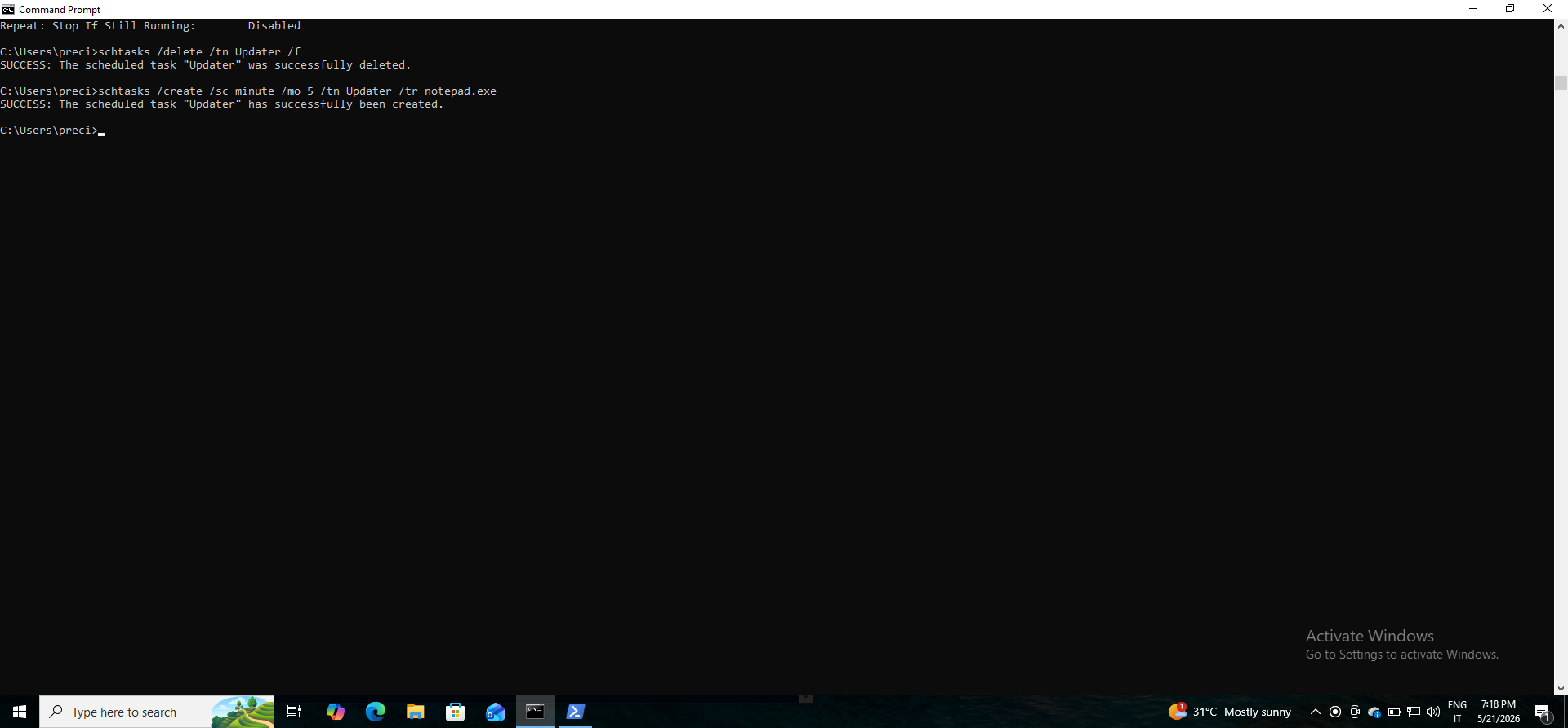
The following command was executed on the Windows VM:
schtasks /create /sc minute /mo 5 /tn Updater /tr notepad.exe
What This Command Does
This command creates a scheduled task named:
Updater
The task:
- Executes every 5 minutes
- Launches
notepad.exe - Persists on the system until removed
- Automatically re-runs based on the configured schedule
This generated:
Windows Event ID 4698
which records scheduled task creation activity.
Screenshot 1 — Scheduled Task Creation Command
Why Scheduled Tasks Are Dangerous
Scheduled tasks are dangerous because they can be used to maintain persistence on compromised systems.
Attackers use them to:
- Automatically relaunch malware
- Maintain long-term access
- Execute payloads repeatedly
- Re-establish command-and-control access
- Trigger malicious activity without user interaction
Unlike one-time process execution, scheduled tasks continue running based on their configured schedule, making them highly effective persistence mechanisms.
Why Attackers Love Scheduled Tasks
Attackers frequently abuse scheduled tasks because they:
- Are built into Windows
- Blend with legitimate administrative activity
- Require no additional malware framework
- Can execute with elevated privileges
- Can be configured to execute silently
- Persist across reboots
Scheduled tasks are considered a common “Living Off The Land” technique because attackers abuse legitimate Windows functionality instead of dropping obvious malware.
Event ID 4698 Investigation
Purpose
Windows Event ID 4698 records scheduled task creation activity.
This event helps analysts identify:
- New scheduled tasks
- Persistence attempts
- Suspicious task execution
- Malware automation
- Unauthorized task creation
SPL Query Used
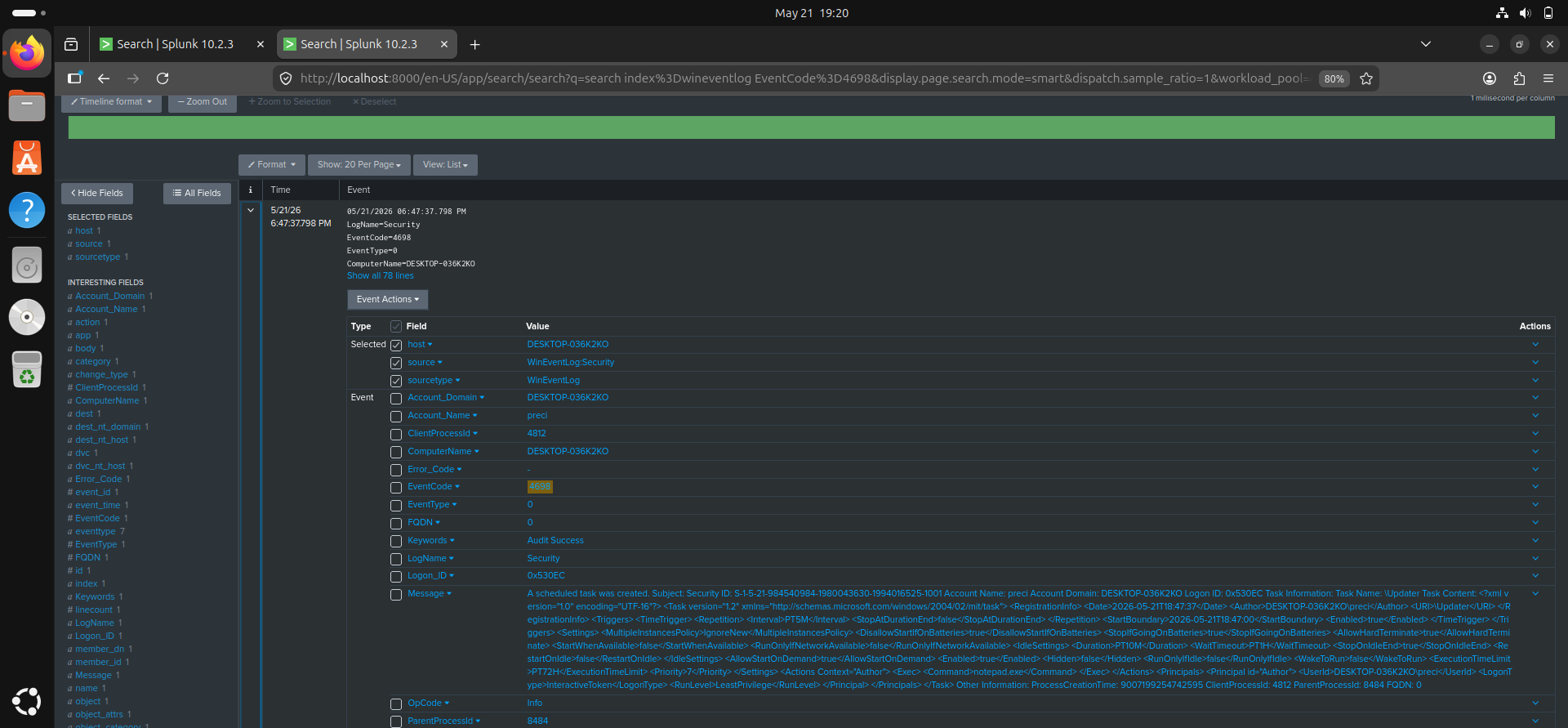
index=wineventlog EventCode=4698
Investigation Findings
The investigation revealed:
- Scheduled task creation activity
- Task name visibility
- Task configuration details
- User responsible for task creation
- Command configured for execution
Important fields analyzed included:
- TaskName
- TaskContent
- SubjectUserName
- Command
- Author
Screenshot 2 — Event ID 4698 Detection in Splunk
Which Scheduled Tasks Increase Suspicion
Several characteristics increase the suspicion level of scheduled tasks.
Examples include:
- Hidden PowerShell execution
- Encoded PowerShell commands
- Tasks launching scripting engines
- Tasks executing from temporary folders
- Tasks using suspicious file paths
- Randomized or misleading task names
- Tasks configured to run very frequently
- Tasks executing external network payloads
Commands involving the following binaries are particularly concerning:
powershell.exe
cmd.exe
rundll32.exe
mshta.exe
wscript.exe
regsvr32.exe
These binaries are commonly abused in real-world attacks.
Legitimate vs Malicious Scheduled Tasks
Legitimate scheduled tasks are commonly created by:
- System administrators
- Backup software
- Antivirus products
- Update services
- Monitoring tools
- Cloud synchronization applications
Legitimate tasks usually:
- Have recognizable names
- Execute trusted binaries
- Run from standard directories
- Are signed by trusted vendors
- Perform expected system functions
Malicious scheduled tasks often:
- Use suspicious scripting engines
- Execute hidden PowerShell
- Run from temporary directories
- Use obfuscated commands
- Attempt outbound network communication
- Mimic legitimate task names
Which Users Increase Severity
The severity of scheduled task creation increases when:
- Non-administrative users create tasks
- Unusual service accounts create tasks
- Newly created accounts generate tasks
- Tasks are created outside normal maintenance windows
- Tasks appear on critical systems unexpectedly
A regular user account creating suspicious persistence tasks is often more concerning than an administrator performing routine maintenance.
How Defenders Reduce False Positives
Because scheduled tasks are widely used in enterprise environments, defenders reduce false positives by analyzing:
- Known-good task baselines
- Trusted software publishers
- Expected administrative activity
- Task naming conventions
- File execution paths
- Historical task behavior
- Frequency of task creation
- Parent process activity
SOC analysts often combine scheduled task detection with:
- PowerShell monitoring
- Network telemetry
- Process creation logs
- Endpoint detection alerts
- Threat intelligence
to improve detection accuracy.
Skills and Knowledge Gained
Through this project, I gained practical experience in:
- Windows persistence detection
- Event ID 4698 analysis
- Scheduled task monitoring
- Splunk SPL searches
- Threat hunting concepts
- Persistence investigation
- SOC investigation workflows
- Detection tuning concepts
Detection Relevance
Scheduled task monitoring is highly important because persistence is a major attacker objective after initial compromise.
Monitoring task creation activity helps defenders identify:
- Malware persistence
- Unauthorized automation
- Payload relaunch mechanisms
- LOLBin abuse
- Long-term attacker access
Scheduled task detection is a critical SOC analyst skill in modern enterprise environments.
Challenges Encountered
Some challenges encountered during the lab included:
- Understanding scheduled task telemetry
- Interpreting Event ID 4698 fields
- Distinguishing legitimate vs suspicious tasks
- Understanding persistence mechanisms
- Evaluating task severity
Resolving these challenges improved my understanding of Windows persistence techniques and SOC detection workflows.
Future Improvements
Future improvements planned for this lab include:
- Detecting malicious PowerShell scheduled tasks
- Monitoring encoded commands
- Correlating scheduled tasks with network activity
- Investigating service creation attacks
- Building persistence detection dashboards
- Simulating full attack chains
Conclusion
This lab improved my understanding of how attackers abuse scheduled tasks to maintain persistence on Windows systems and how SOC analysts detect this activity using Splunk.
By analyzing Event ID 4698 logs and investigating task creation activity, I gained practical experience in:
- Persistence detection
- Scheduled task monitoring
- Threat hunting concepts
- Detection tuning
- Security event analysis
- SOC investigation workflows
This project strengthened my understanding of how persistence mechanisms are used in real-world attacks and how defenders identify suspicious scheduled task activity in enterprise environments.
Author
Precious Anyanwu
| Cybersecurity Learner | SOC Analyst Path | Splunk SIEM Practice |