Splunk Service Persistence Detection Lab 7045 Investigation
Splunk Windows Service Persistence Detection Lab
Detecting Malicious Service Creation Using Windows Event ID 7045
Overview
This project documents a hands-on SOC detection lab focused on identifying malicious Windows service creation using Splunk and Windows Event Logs.
The objective of the lab was to understand how attackers abuse Windows services for:
- Persistence
- Privileged execution
- Background malware execution
- Stealthy long-term access
Using Splunk Enterprise and Windows telemetry, I investigated:
- Windows service creation
- Event ID 7045
- Service-based persistence
- Service execution behavior
- Correlation between service creation and process execution
- Detection tuning concepts
This lab introduced another major attacker persistence and execution technique commonly observed in enterprise environments.
Why Windows Services Matter
Windows services are highly valuable to attackers because they:
- Can automatically start during boot
- Often execute with SYSTEM privileges
- Run silently in the background
- Blend into legitimate operating system activity
- Persist even after reboots
Services are heavily abused in:
- Ransomware operations
- Remote execution frameworks
- Malware persistence
- Lateral movement
- Privilege escalation activity
Because legitimate administrators also create services regularly, service creation events are considered:
High-value but noisy telemetry
This makes proper investigation and correlation extremely important for SOC analysts.
Lab Environment
Virtual Machines Used
| Machine | Purpose |
|---|---|
| Ubuntu VM | Splunk Enterprise Server |
| Windows VM | Endpoint telemetry source |
| Kali Linux VM | Additional SOC lab environment |
Technologies Used
| Tool | Purpose |
|---|---|
| Splunk Enterprise | SIEM and log analysis |
| Windows Event Logs | Security telemetry |
| CMD | Service creation execution |
| sc.exe | Windows service management utility |
| Windows Services | Persistence mechanism |
LAB — Malicious Service Creation
Objective
The objective of this lab was to simulate attacker persistence through Windows service creation and investigate the resulting telemetry using Splunk.
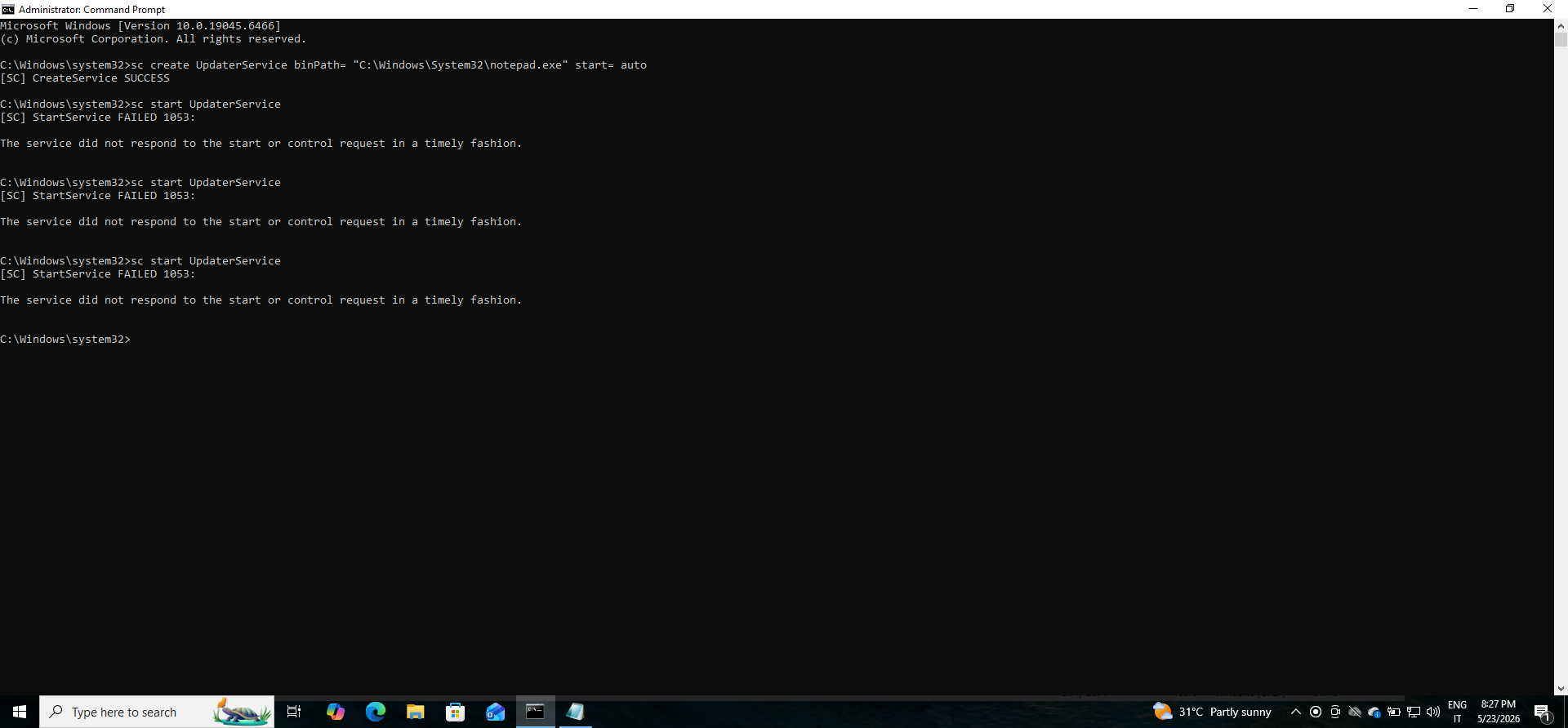
The following command was executed as Administrator:
sc create UpdaterService binPath= "C:\Windows\System32\notepad.exe" start= auto
The service was then started using:
sc start UpdaterService
What This Command Does
The command creates a Windows service named:
UpdaterService
configured to:
- Automatically start during boot
- Execute
notepad.exe - Run in the background
- Persist on the system until removed
This generated:
Windows Event ID 7045
which records service installation activity.
Why Attackers Abuse Services
Attackers frequently abuse Windows services because they provide:
- Long-term persistence
- Silent execution
- Elevated privileges
- Automatic execution after reboot
- Legitimate-looking system behavior
Unlike standard user processes, services operate in the background and often avoid immediate user visibility.
This makes them highly effective for:
- Ransomware execution
- Malware persistence
- Remote access tools (RATs)
- Lateral movement frameworks
- Post-exploitation activity
Why Running as SYSTEM Matters
Many Windows services execute with:
NT AUTHORITY\SYSTEM
privileges.
SYSTEM is one of the highest privilege levels on Windows systems and provides attackers with:
- Full system access
- Access to sensitive files
- Ability to disable security controls
- Credential access opportunities
- Greater persistence capabilities
Malicious services running as SYSTEM significantly increase attack severity.
Event ID 7045 Investigation
Purpose
Windows Event ID 7045 records service installation activity.
This event helps analysts identify:
- New services
- Persistence attempts
- Suspicious service execution
- Malware installation behavior
- Unauthorized service creation
SPL Query Used
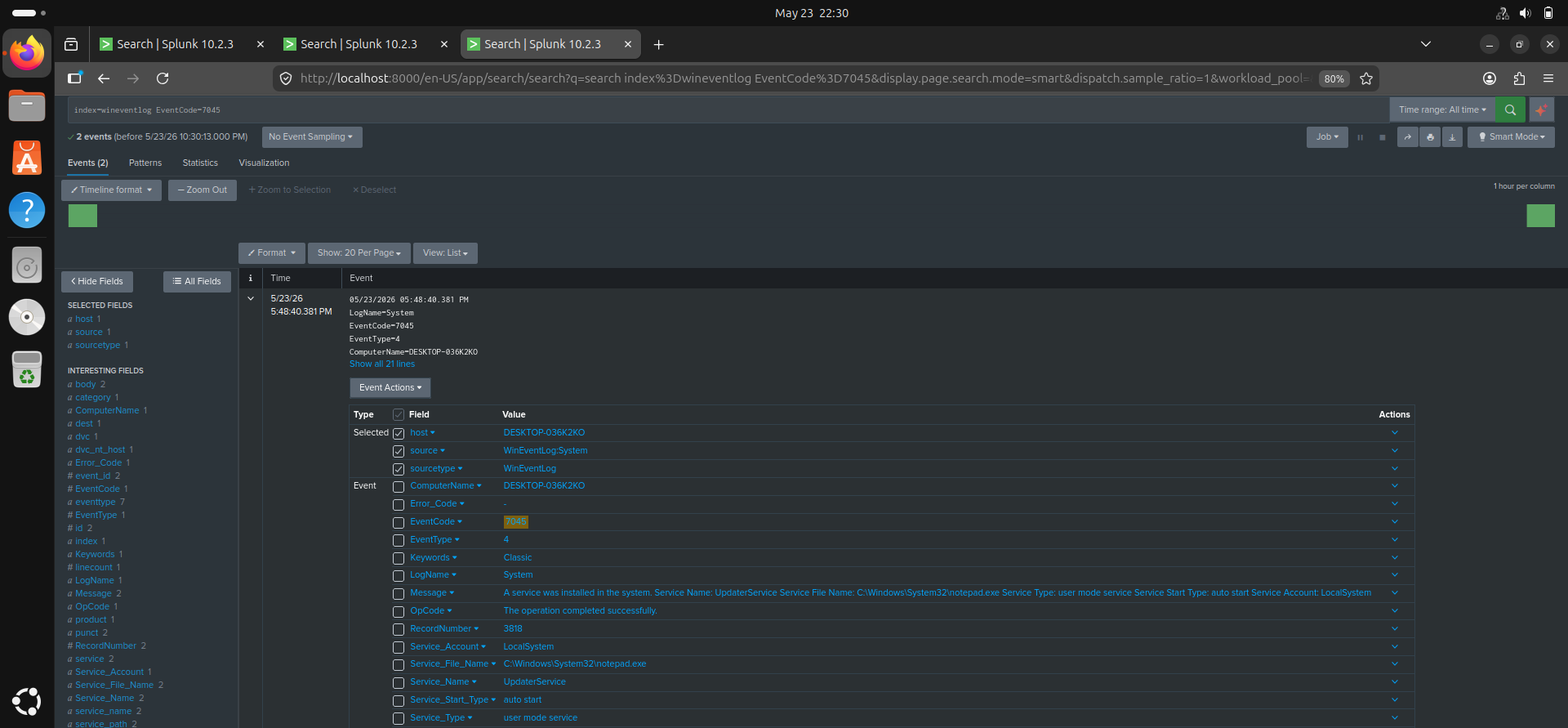
index=wineventlog EventCode=7045
Investigation Findings
The investigation revealed:
- New service installation activity
- ServiceName visibility
- ImagePath visibility
- StartType configuration
- Service account information
Important fields analyzed included:
- ServiceName
- ImagePath
- ServiceType
- StartType
- AccountName
Which Service Names Increase Suspicion
Several service naming patterns increase suspicion.
Examples include:
- Fake Microsoft-looking names
- Misspelled Windows services
-
Generic names like:
- Updater
- WindowsUpdate
- SecurityService
- DefenderUpdate
- Randomized service names
- Services mimicking antivirus software
Attackers commonly use deceptive names to blend malicious services into legitimate system activity.
Which ImagePaths Worry Defenders
Defenders become highly suspicious when services execute from locations such as:
C:\Users\
C:\Temp\
AppData\
Downloads\
Other suspicious indicators include:
- PowerShell configured as a service
- LOLBins used as service executables
- Encoded PowerShell commands
- Unsigned executables
- Network-accessing payloads
Examples of concerning executables include:
powershell.exe
cmd.exe
rundll32.exe
mshta.exe
regsvr32.exe
These are commonly abused in real-world attacks.
Legitimate vs Malicious Service Creation
Legitimate services are commonly created by:
- Operating system components
- Enterprise software
- Security tools
- Backup solutions
- Monitoring platforms
- System administrators
Legitimate services typically:
- Use trusted file paths
- Are digitally signed
- Have recognizable names
- Match expected software behavior
Malicious services often:
- Use suspicious execution paths
- Execute scripting engines
- Use deceptive service names
- Attempt outbound network communication
- Operate from user-controlled directories
Why Event ID 7045 Alone Is Insufficient
Event ID 7045 alone is often insufficient because service creation by itself does not always indicate malicious behavior.
Many legitimate applications install services regularly.
SOC analysts must therefore correlate 7045 with additional telemetry such as:
- Process creation events (4688 or Sysmon Event ID 1)
- PowerShell activity
- Network connections
- File creation events
- Authentication logs
- Endpoint detection alerts
Correlation helps determine whether service creation is part of a broader attack chain.
Correlating Service Creation with Process Execution
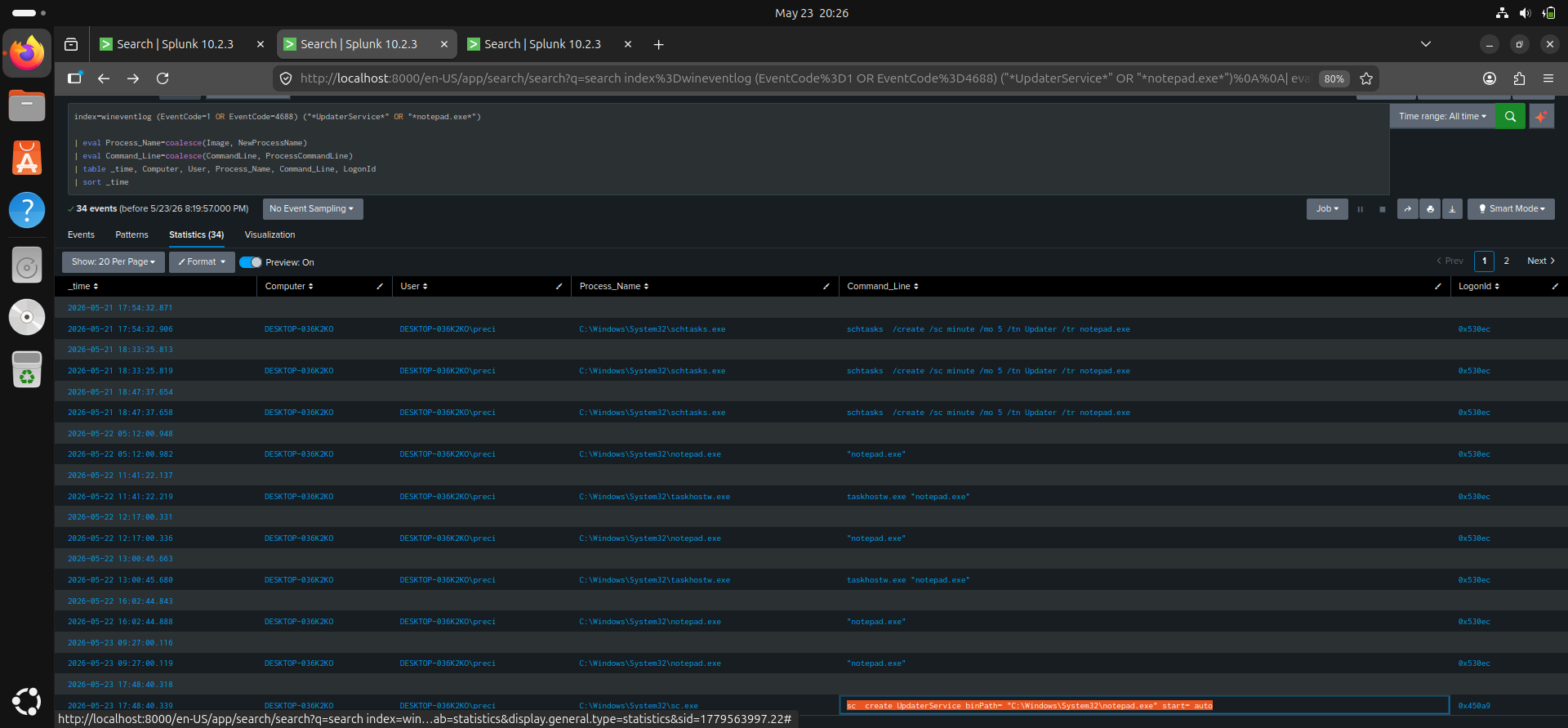
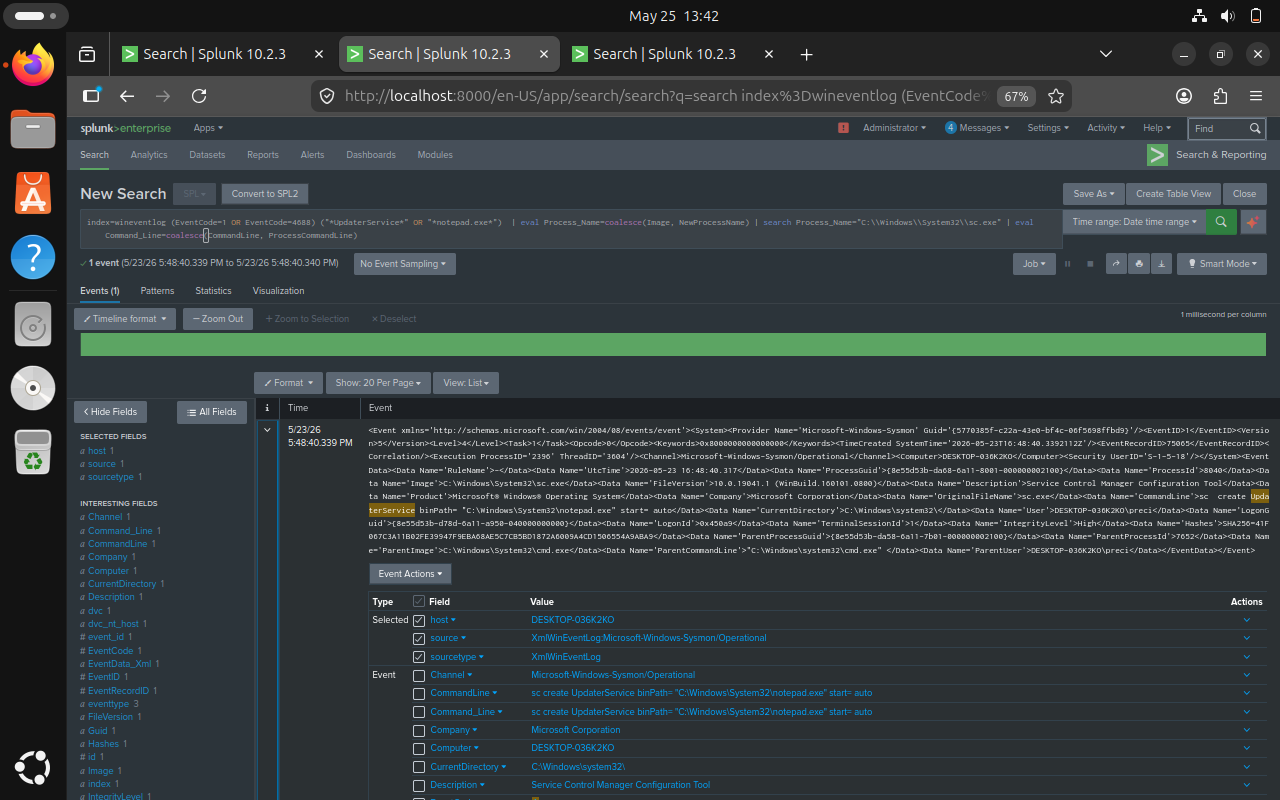
To improve investigation accuracy, I correlated:
- Event ID 7045 (service creation)
- Event ID 4688 (process creation)
This helps reconstruct attacker behavior and determine whether the created service actually executed.
Correlation SPL Query
index=wineventlog (EventCode=7045 OR EventCode=4688)
Correlation Findings
The investigation revealed:
sc.exe
      └── service installation
              └── notepad.exe execution
This demonstrated how service persistence can lead directly to process execution activity.
How Defenders Reduce Noise
Because service creation occurs frequently in enterprise environments, defenders reduce false positives by analyzing:
- Known-good service baselines
- Trusted software publishers
- Standard installation behavior
- Service naming conventions
- Execution paths
- Digital signatures
- Parent processes
- Historical service activity
Detection tuning is critical to avoid excessive alert fatigue.
Skills and Knowledge Gained
Through this project, I gained practical experience in:
- Windows service persistence detection
- Event ID 7045 analysis
- Service execution monitoring
- Splunk SPL searches
- Threat hunting concepts
- Detection correlation
- Persistence investigation
- SOC investigation workflows
Detection Relevance
Service monitoring is highly important because services are one of the most abused persistence and execution mechanisms in Windows environments.
Monitoring service creation helps defenders identify:
- Malware persistence
- Unauthorized execution
- Privileged attacker activity
- LOLBin abuse
- Long-term compromise attempts
Service persistence detection is a critical SOC analyst skill.
Challenges Encountered
Some challenges encountered during the lab included:
- Understanding service telemetry
- Interpreting Event ID 7045 fields
- Distinguishing legitimate vs malicious services
- Understanding privileged execution
- Correlating service creation with process execution
Resolving these challenges improved my understanding of Windows persistence mechanisms and SOC investigation workflows.
Future Improvements
Future improvements planned for this lab include:
- Detecting malicious PowerShell services
- Monitoring suspicious ImagePaths
- Correlating services with network activity
- Investigating lateral movement behavior
- Simulating ransomware execution chains
- Building service persistence dashboards
Conclusion
This lab improved my understanding of how attackers abuse Windows services for persistence and privileged execution and how SOC analysts investigate this activity using Splunk.
By analyzing Event ID 7045 and correlating it with process execution telemetry, I gained practical experience in:
- Persistence detection
- Service monitoring
- Threat hunting
- Event correlation
- Detection tuning
- SOC investigation workflows
This project strengthened my understanding of how Windows services are abused in real-world attacks and how defenders detect suspicious service activity in enterprise environments.
Author
Precious Anyanwu
| Cybersecurity Learner | SOC Analyst Path | Splunk SIEM Practice |